


How to take bookings
on WhatsApp
Make better use of your group chats
If you run your community through WhatsApp, whether that's a group chat, a broadcast list, or one-to-one messages, you can take bookings there with nothing more than your Bookable link.
There's no separate app or setup needed on the WhatsApp side, you paste the link the same way you'd share anything else.
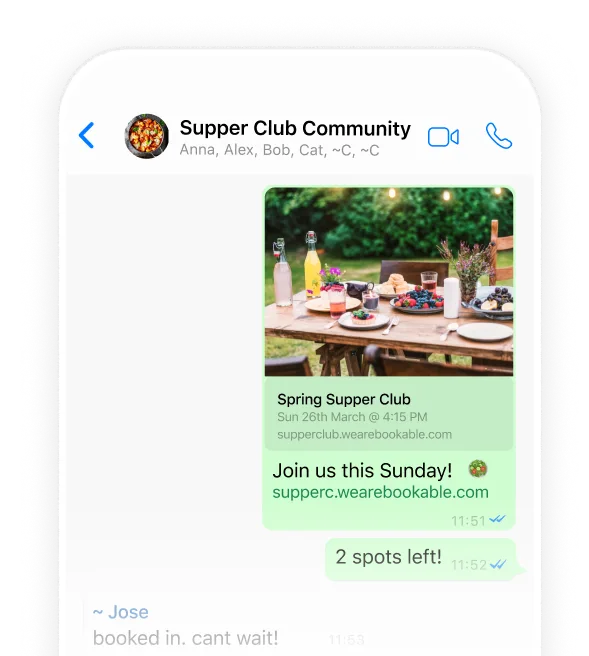
Share your link in a chat or group
Copy your event or schedule link from Bookable and paste it into any WhatsApp chat or group, the same as you'd share a photo or a voice note.
When you paste it, WhatsApp automatically renders a preview card showing the event image, title, and date. People can tap straight through and book from there.
What happens when
someone taps the link
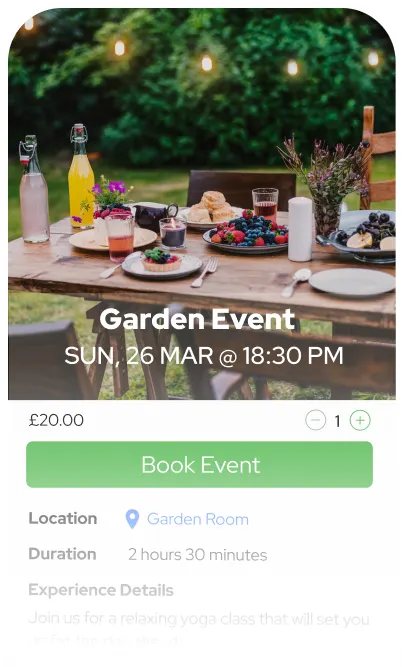
The link opens in the recipient's regular mobile browser, not inside WhatsApp itself. From there, the booking flow works exactly the same as anywhere else, they see your event, pick a time if relevant, and book.
Taking payment for
bookings from WhatsApp
Your chat members can pay by card, Apple Pay, or Google Pay. If you'd rather handle payment directly, switch to custom instructions like cash on the day or a bank transfer. Regulars can also book using credits, so no one's re-entering card details for every session.